This gorgeous tag was created by Pammers using a tut she wrote,
using a mask from the EFR Blog! You can find this tut at her
blog CLICK HERE. Thank you Pammers!
Blog title
"The world of reality has its limits; the world of imagination is boundless." --Jean-Jacques Rousseau
Tuesday, June 23, 2026
Tutorial 'Beach Babe' by Pammers
Saturday, May 30, 2026
Red, White & Boo!
exclusively for the EFR Blog! You can find more of her fantastic tut
Monday, March 31, 2025
Tutorial 'Fairy Dust' by Pammers
tutorial she wrote exclusively for the EFR Blog! You can find more
of her amazing work at her blog, pammerspassionsai.blogspot.com.
Monday, March 17, 2025
Happy Easter Tutorial by Pammers
Sunday, March 9, 2025
St. Patrick's Day Tutorial by Pammers
This tag was created by Pammers from a tutorial she wrote, using a template from the EFR Blog! You can find this awesome tutorial at Pammers blog at pammerspassionsai.blogspot.com. Thank you Pammers for this awesome tut and for the gorgeous tag!
Sunday, February 23, 2025
St. Patrick's Day Tutorial by Pammers
Saturday, February 15, 2025
Mardi gras Tutorial by Pammers
Saturday, January 4, 2025
Tutorial by Pammers
This stunning tag was created by Pammers, an amazing tagger & admin
at the EFR forum, using one of the templates shared HERE by Kathyfrances!
You can find this lovely tut at Pammers blog, pammerspassionsai.blogspot.com.
Thank you Pammers!
Thursday, August 15, 2024
Tutorial by Pammers
Wednesday, December 27, 2023
New HNY Tutorial by Pammers!
Sunday, October 1, 2023
Cute Witch Tutorial by Pammers
Sunday, May 14, 2023
FTU PU Cluster Frame 'Peaceful Glen' Persia Designs
Saturday, August 13, 2022
Easy Name Tag Tutorial by Kelli
Open a new image 500x500 With a transparent background.
You may need to resize your canvas depending on how long the name or text is
Grab your text tool and choose your font.
I am using Jumping Flash size 48. Stroke 2; Kerning -150.
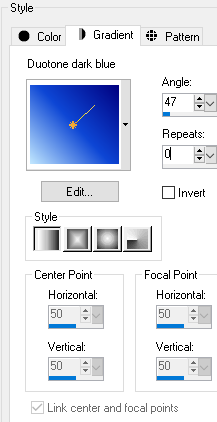
Foreground Black, b/g a gradient of choice.
Here are my settings

Add your text
Align in center of canvas, convert to raster.
With your magic wand, and the gradient layer active,
Click inside each letter.
Expand the selection by 3.
Add a new raster layer and drag it to bottom.
Flood fill with White.
Keep selected and contract the selection by 6.
Add a new layer and drag it above the gradient layer.
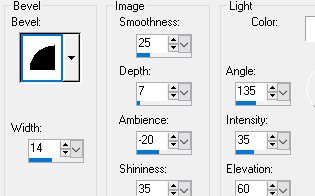
Go effects and cut out with these settings

Contract the selection by 2.
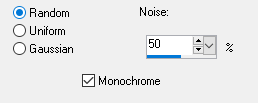
Add noise with these settings
And then repeat the inner bevel.
Deselect.
Merge visible.
Add your tube.
I resized this tuby by 35%
Sharpen
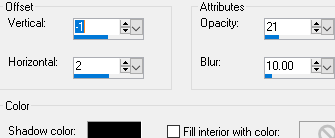
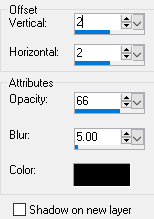
Add drop shadow of choice.
Here are my settings

Crop and then add copyright.
Save as a PNG.
Thanks for trying my tutorial!
I would love to see your results!
Thursday, April 14, 2022
New Template by Pammers!
Thursday, March 17, 2022
Tutorial by Rita 'Bobbie’s Bear'
Tuesday, March 1, 2022
Tutorial: 'Easter' by Mimi's Madness
Friday, February 18, 2022
Tutorial: 'In Like A Lion' by Mimi's Madness
Please let us know if you do the tutorial, we'd love to show off your results!
Thank you, Kel!
Tuesday, February 15, 2022
Bright - PTU Tutorial by Pammers
Tuesday, December 7, 2021
Tutorial: 'Winter Wonderland' by Mimi's Madness
This awesome tag was created by Kelli! You can find the tutorial for it at her
blog, Mimi's Madness. Thank you Kelli for this awesome tut!
You can get a mask to use in the tut from right here at the blog, HERE.
Saturday, December 4, 2021
Tutorial: Jolly Winter & Bright Noise by Mimi's Madness
This gorgeous tag was created by Kelli! You can find the tutorial for it at her
blog, Mimi's Madness. Thank you Kelli for this awesome tut!
You can get a mask to use in the tut from right here at the blog, CLICK HERE.
While there, check out the tutorial called Bright Noise! Also by Kelli and
is perfect for the holidays! CLICK HERE